
| accueil | produits | télécharger | acheter | support | info | FORUM | a propos |

|
|
||||||||||
|
 |
|
Freeware pages CD Bank pages New file wizard
|
Folder Tag descriptionFolder Tag - is a simple, tiny, nothing-less software. Folder Tag adds the new document "Folder tag" to Windows Explorer "File|New" menu. Tag - small file with text description and key words list, which you can place in any Windows folder. Folder Tag allows you to type some text, assign set of key words from user defined list, auto-save it by window close and store the window position for each file. Folder Tag Search tool allow you to search the tags on your computer. Why use the Folder Tag?By using Folder Tag, you can quick and easy describe any folder on your computer, assign the text memo, build the system of notes and markers. DownloadDownload the Folder Tag v1.1 - ftsetup.exe (85 kb). Folder Tag interface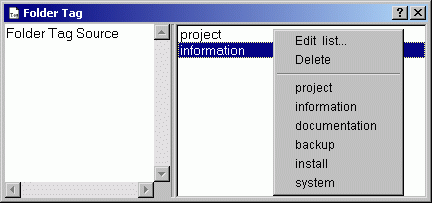 Left panel contain the text description. Right panel contain the keyword list. How to install?Execute ftsetup.exe. Program will install to selected location and adds the new item "Folder Tag" to Explorer "New" menu. If new item doesn't appear immediately, please, wait a moment. Installing is easy and doesn't take any manual input. For uninstall - select "Programs|Qunom|Folder Tag|Uninstall". Version history
Folder Tag PAD-filePAD-file for Folder Tag: http://www.qunom.com/pad/ftagpad.xml. Use it free for getting last-updated information. Full list of all PAD-files see at Support page.
|