
| accueil | produits | télécharger | acheter | support | info | FORUM | a propos |

|
|
||||||||||
|
 |
|
CD Bank pages |
New file wizard and Total CommanderNew file wizard - tool for Windows Explorer, Total Commander plugin and other file managers. Create new file by user template, saving history list. Work directly from the shell. How to install?Execute nfsetup.exe. Program will install to selected location and adds the new item to Explorer "New" menu. If new item doesn't appear immediately, please, wait a moment. Installing is easy and doesn't take any manual input. Using with file managersFile managers is software used for Windows Explorer replacement. This way preferred by computer enthusiast, who looking for more powerful file handling. How to configure the Total Commander?I'm using the Total Commander and create the "New File" as tool for this manager. For integrate the tool to Total Commander follow these simple instructions: add new button to TC toolbar and input some parameters. Look at this picture: 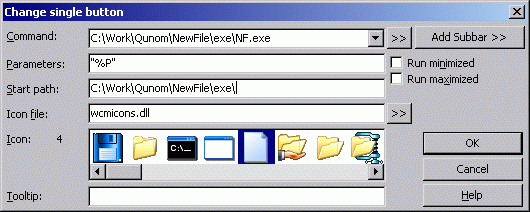 These add the New File to the Total Commander toolbar. Parameters %P causes the source path to be inserting into the command line, including a backslash (\) at the end. Double quotes is used for correct proceed the long paths with spaces ("C:\Documents and Settings\Default User\My docs", for example). For more information see the Total Commander help, topic "Dialog box: Configuration - Change button bar". If you are using other file managerIf you don't find instructions for your preferred file manager, you can do the same configuration by yourself! It's simple. You can also send result to us, and we are public it on this page. Back to New file wizard page. Go to Total Commander official site. |
|
accueil | produits | télécharger | acheter | support | info | a propos |