| overview | products | download | order | support | info | FORUM | about |

|
|
||||||||||
|
 |
How to organize the disk catalog
IntroductionDownload CD Bank Cataloguer and create your own disk database. The program interface is simple, powerful, and easy to use. All functions are fully defined in the "Help" system. Dialogs are effective and the program is fast. Use the Language Packs to translate CD Bank into to your native language. Install CD Bank and immediately start creating your personal disk catalog. To maximize CD Bank's potential, use the following suggestions to quickly maintain your catalog, your disks and their contents. Follow a few simple steps, some useful tips and you're on your way to taming that unmanageable stack of disks in no time. Tips and SuggestionsTune the program before adding disks massively:
Fill the optional disk properties:
Use and define several "Import Schemes". Create schemes for music, clip art, backups, etc. 'Import Schemes' is a powerful tool that will optimize disk scanning and the thumbnail creation process, completely tailored to your needs. 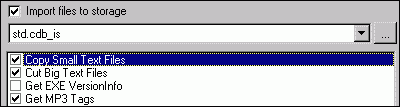 Use "Search in selected (group or disk)" command in group's tree context menu. Use "Search the disks" condition in search dialog. This is a quickest way to find the disk by name, fragment of description or location. Disk searching works very fast. CD Bank deliversCreate your disk database for. .cataloging music, graphics, and even document collections - use the "Import files to storage" option and generate file previews and thumbnails for ease of navigation. .cataloging DVD's - write a disk description and set the cover image. .managing your loaned disk - fill in the borrowers list and use the filters in "View all loans" dialog to track each disks whereabouts and when they're due back. .sharing yours database (disks list) with friends - print a detailed report or export disks to a selected CD Cover. .don't find what you need? If you'd like to see some added features, send your suggestions to our support team! We are working hard to make CD Bank perfect - our customers and your suggestions count. Adding disksAdding disks is a central part of catalog maintenance. But, just add the disk once and you'll be able to access all the information about its contents. "What does the disk contain?" Information created automatically:
"What is this disk about and how I can find it?" Information edited manually:
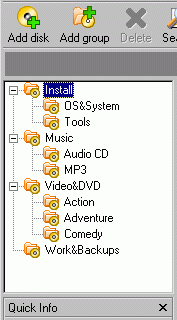
Group structureCreate an individualized "group tree" first. Each group can contain an unlimited number of disks and sub-groupings. Choose your structure based on how you plan on navigating through your collection of disks. It's best to make a multi-leveled hierarchy (see the following) as opposed to a single group with hundreds of disks.
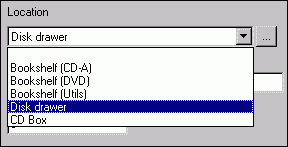
Locations list
It's best to return each media back to it own place then you do not use it. Disk name and description"Disk name" is the main disk parameter. By default it is the same as the disk volume label, but it's best to give the name a uniquely decipherable title. After a few years you could forget a title such as "WB2002". Type something like "Backup of work docs from 2003"! This will facilitate any future search. "Disk description" also has a default value. It can be simple, like "Disk WB2002 loaded at 15/12/2004", or can contain macros with disk parameters. Assign a template with the desired information and type the 2 or 3 line of text for each important disk then you add. These allow you to search the disk by one or two words from description.
See help system, "Disk description Macros" topic for more information about description templates. Once the catalog is createdOnce the catalog is created, you can:
Finding a particular disk can be difficult if your collection numbers in the hundreds and is kept in numerous locations. CD Bank simplifies the task by allowing you to:
You've got your disk and file in hand. Everyone's happy now. World peace is at hand. Bonus features of CD BankBecause your catalog is under control and well maintained, there are some added bonuses to having a structured database. For example, you can:
You have full control over your CD catalog. What are you going to do with all that extra time? Printable version of this page |
accueil | produits | télécharger | acheter | support | info | a propos |